

Construct-aware lesson adaptation
Adaptation Engine
Adapt existing lessons while keeping instructional intent, source traceability, and teacher judgment visible.
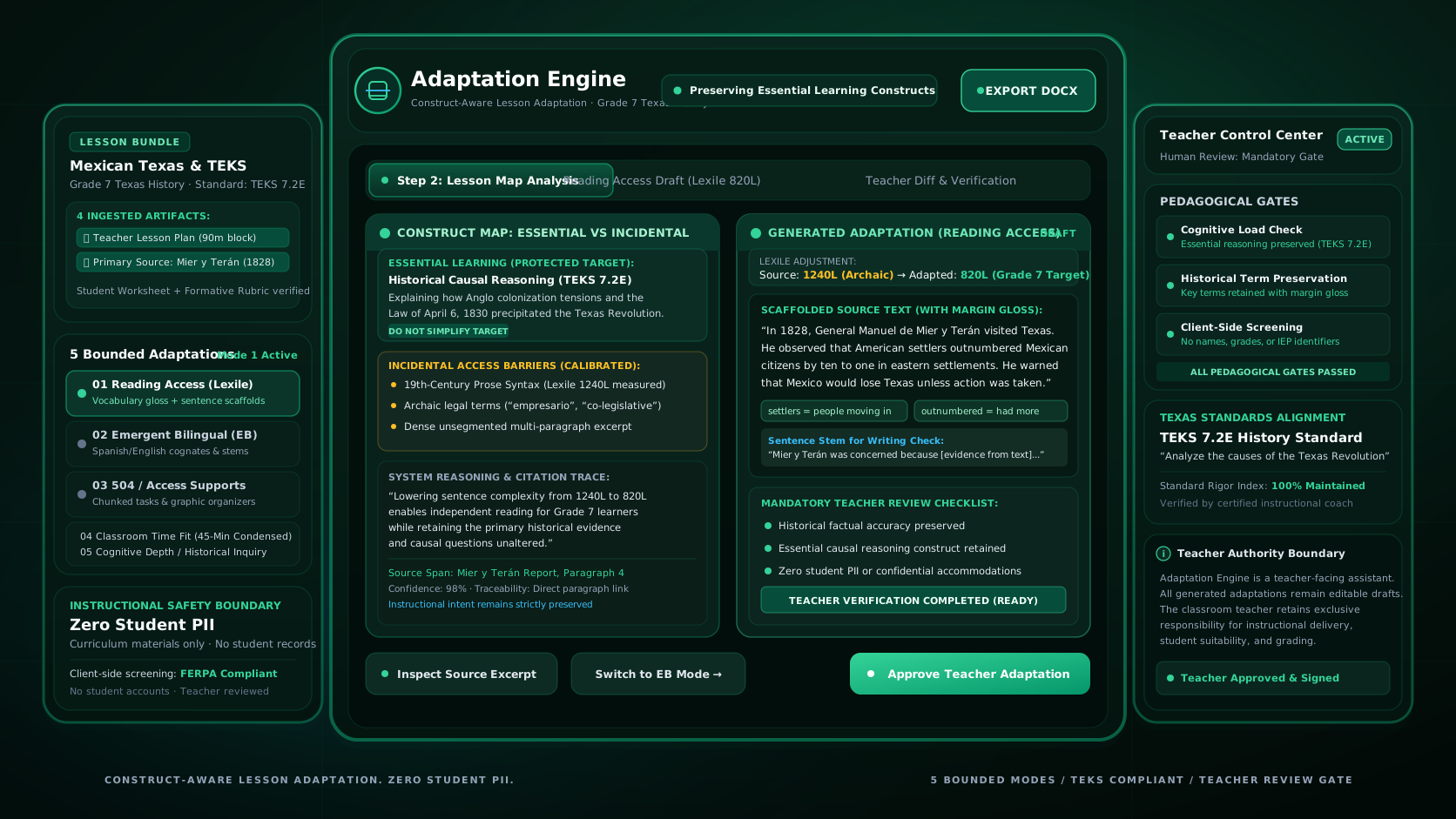
Adaptation Engine is a teacher-facing proof of concept for adapting existing Texas middle school lessons. A teacher uploads an instructional bundle, reviews a structured Lesson Map of what major tasks appear to measure, and can generate one of five bounded adaptations for reading access, emergent bilingual support, teacher-selected access supports, classroom time, or deeper reasoning. Generated materials remain drafts until the teacher reviews them, and the system keeps source references and instructional boundaries visible throughout the workflow.
Safety note
Adaptation Engine is designed for instructional materials, not student records. Do not upload IEPs, 504 plans, ARD or LPAC records, BIPs, rosters, gradebooks, identified student work, or student information tied to performance or support needs. The current screening controls are backstops, not a complete PII detection system.
- Status
- Narrow proof of concept
- Adaptation modes
- 5 bounded outputs
- Access
- Approved testers only
- Production deployment
- Not deployed
The problem
Changing access should not quietly change what a lesson is asking students to do.
Lesson adaptation is not simply a rewriting problem. Reading, writing, English proficiency, computation, or production demands may be central to a task, incidental barriers around the task, or absent altogether. A change that helps in one lesson can change the intended work in another.
Adaptation Engine makes those decisions inspectable. It analyzes the lesson first, asks the teacher to resolve uncertain judgments, and then generates within a bounded adaptation mode rather than treating every request as unrestricted rewriting.
Product walkthrough
See the lesson adaptation workflow in the interface.
The current application connects lesson upload, Lesson Map review, adaptation configuration, generated output, source inspection, editing, review, and export in one teacher-owned workspace.
Annotated views based on the current Adaptation Engine interface.
Multi-format lesson bundle upload and privacy verification
Upload source lesson materials, student worksheets, and rubrics. Adaptation Engine parses content client-side with zero PII retention and auto-identifies academic standards.
60-second executive walkthrough of Adaptation Engine from multi-file bundle upload to verified DOCX export.
How it works
The teacher stays in the loop from source material to final export.
- STAGE // 01
Upload the lesson
Create a private lesson workspace and add supported instructional files such as PDF, DOCX, TXT, or Markdown.
- STAGE // 02
Analyze the bundle
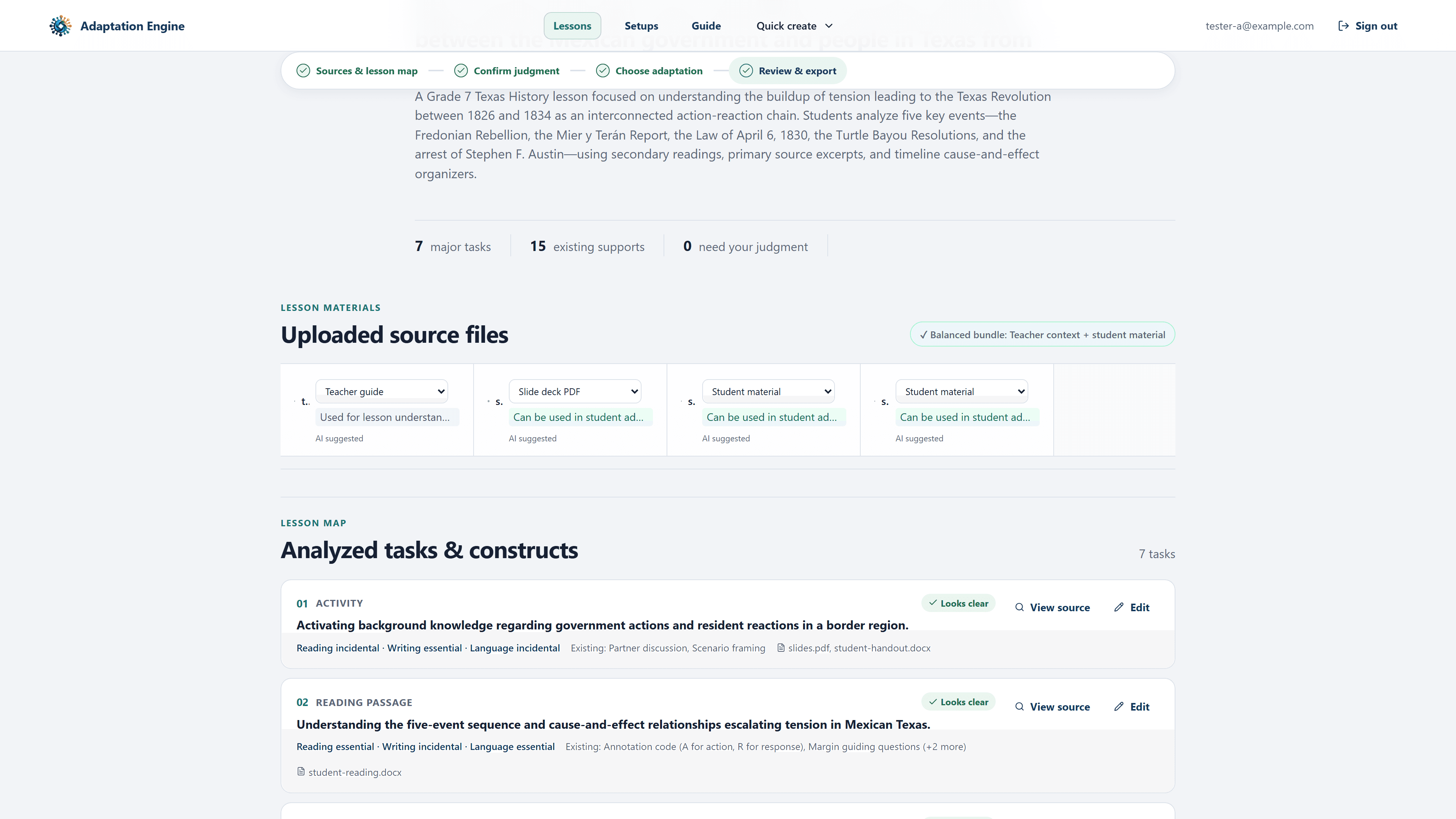
The system extracts readable content, organizes source blocks, identifies major instructional tasks, and proposes intended constructs and instructional loads.
- STAGE // 03
Confirm the Lesson Map
The teacher reviews uncertain construct, load, and file-role judgments. Generation stays blocked while required judgments remain unresolved.
- STAGE // 04
Choose the adaptation
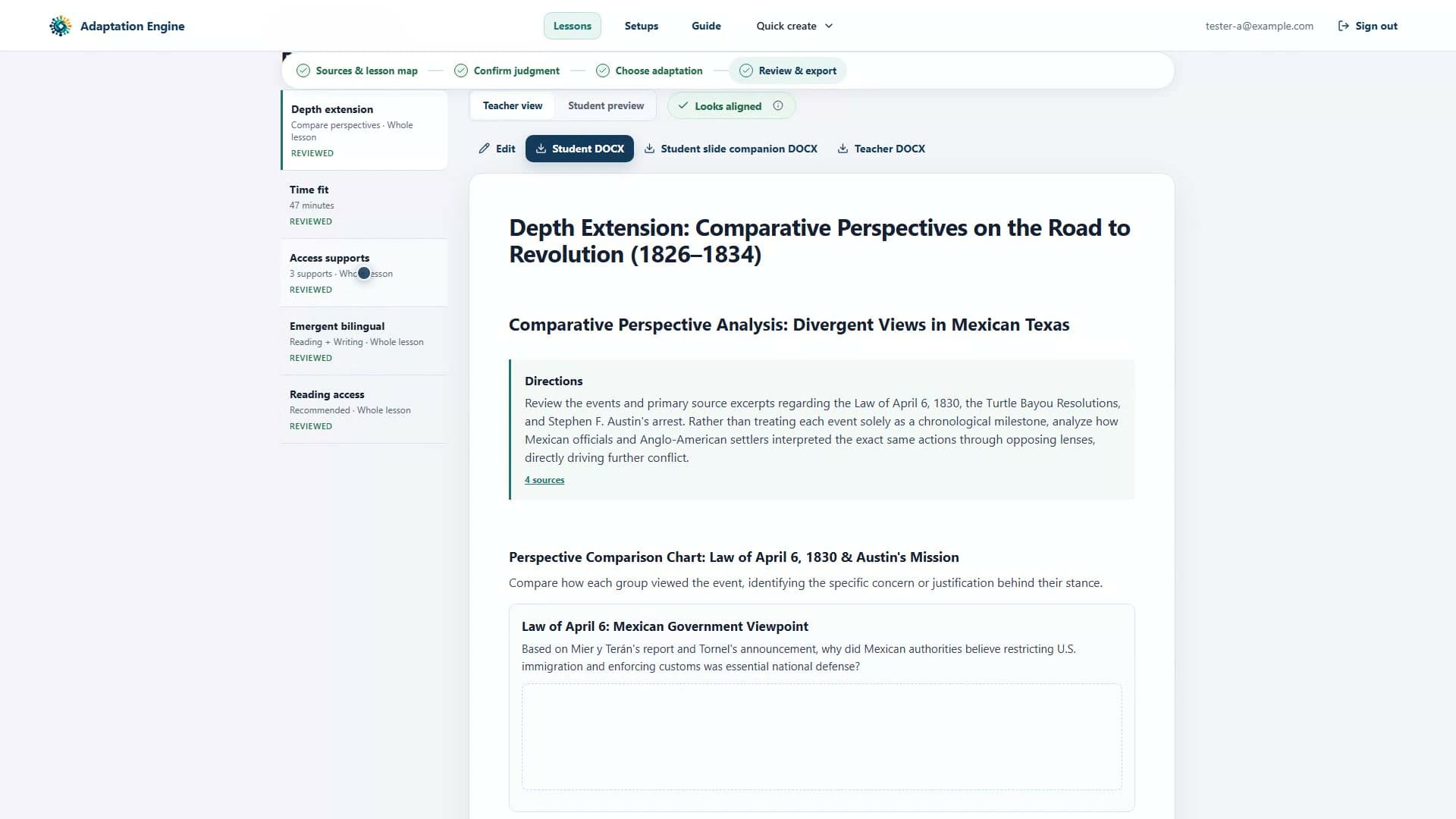
Select Reading Access, Emergent Bilingual Support, Access Supports, Time Fit, or Depth Extension and configure the options allowed for that mode.
- STAGE // 05
Review and edit the draft
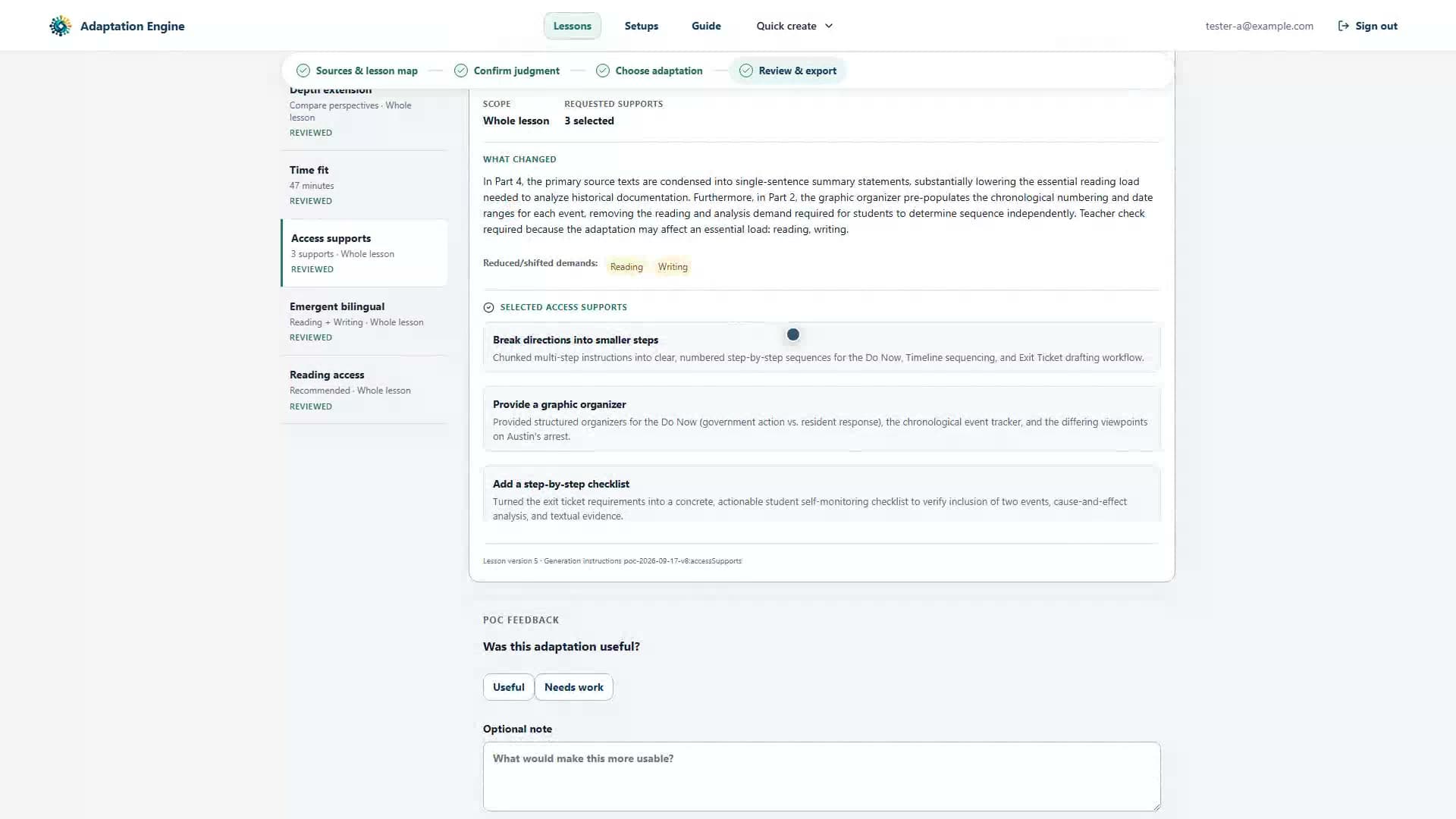
Inspect the generated classroom document, adaptation explanation, source references, and construct-risk guidance. Teacher edits return the artifact to draft status.
- STAGE // 06
Mark reviewed and export
Complete the review checkpoint, explicitly mark the current version reviewed, and export an eligible teacher or student DOCX.
- 01
Upload the lesson
Create a private lesson workspace and add supported instructional files such as PDF, DOCX, TXT, or Markdown.
- 02
Analyze the bundle
The system extracts readable content, organizes source blocks, identifies major instructional tasks, and proposes intended constructs and instructional loads.
- 03
Confirm the Lesson Map
The teacher reviews uncertain construct, load, and file-role judgments. Generation stays blocked while required judgments remain unresolved.
- 04
Choose the adaptation
Select Reading Access, Emergent Bilingual Support, Access Supports, Time Fit, or Depth Extension and configure the options allowed for that mode.
- 05
Review and edit the draft
Inspect the generated classroom document, adaptation explanation, source references, and construct-risk guidance. Teacher edits return the artifact to draft status.
- 06
Mark reviewed and export
Complete the review checkpoint, explicitly mark the current version reviewed, and export an eligible teacher or student DOCX.
Five adaptation modes
Different classroom problems use different generation constraints.
Reading Access
Reduce incidental reading barriers while preserving the teacher-confirmed lesson target and keeping every selected instructional task represented.
Emergent Bilingual Support
Add lesson-level language supports across teacher-selected listening, speaking, reading, or writing domains without inferring an individual learner’s proficiency.
Teacher-Selected Access Supports
Apply only support types selected by the teacher. The application does not diagnose a disability, determine eligibility, or create a 504 plan.
Time Fit
Build a teacher-facing keep, compress, and cut plan for a selected class period while retaining evidence needed for the lesson’s central target.
Depth Extension
Increase cognitive demand through approaches such as comparison, argumentation, evidence weighing, source evaluation, synthesis, or inquiry rather than simply adding more work.
Saved Setups and Quick Create
Save eligible generic adaptation configurations, pin frequently used setups, and start a new lesson from a reusable configuration without storing student-specific support information.
Teacher authority
AI proposes. Application rules constrain. The teacher decides final use.
Lesson Map correction
Teachers can correct intended constructs, instructional loads, and uncertain analysis before generation proceeds.
Task targeting
Eligible adaptation modes can target selected instructional tasks rather than automatically changing the entire lesson.
Source inspection
Generated content can retain links to canonical lesson source blocks so teachers can inspect where material came from.
Editable drafts
Generated documents remain editable, while protected source excerpts are resolved from canonical stored source text rather than rewritten by the model.
Review reset
Editing generated content resets its review state so an earlier approval cannot silently carry over to changed material.
Stale-output protection
If the underlying lesson or analysis changes, older generated artifacts become stale and cannot be exported as though they still reflected the current lesson.
Data and instructional boundaries
The current proof of concept deliberately avoids student-specific records.
Adaptation Engine is built around teacher-owned instructional material rather than student profiles. Authentication and ownership checks isolate lesson workspaces, Firestore access stays server-side, source uploads use owner-scoped Storage paths, and student-facing generation excludes raw teacher-guide, answer-key, and uncertain-role source material.
Do not assume the current POC provides
OPERATIONAL BOUNDARIES- 01
student accounts or student-facing AI sessions
- 02
IEP, 504, ARD, LPAC, BIP, roster, gradebook, or identified student-work processing
- 03
automatic disability, eligibility, accommodation, or language-proficiency inference
- 04
formal proof that an adaptation preserved a construct
- 05
legal-compliance or STAAR-allowability determinations
- 06
complete PII or student-record detection
- 07
automatic publishing, sharing, emailing, or assignment
Intended use
Built around a teacher adapting material they already plan to teach.
Current primary user
- 01
Texas middle school teachers
- 02
Teachers adapting existing lesson bundles rather than generating an entire curriculum from scratch
- 03
Teachers who want access, language, pacing, or depth changes to remain inspectable before classroom use
A suitable testing context provides
- 01
pre-cleared instructional materials rather than student records
- 02
a teacher who can review instructional intent and generated output
- 03
a controlled account rather than anonymous public access
- 04
time to inspect and revise generated material before classroom use
The current runtime models one authenticated teacher or tester who owns their own lessons. Student, department, district, and shared-workspace roles are outside the present POC.
Current implementation
A functioning end-to-end proof of concept, not a production deployment.
The current main branch implements the teacher workflow from authentication and upload through analysis, adaptation, review, DOCX export, feedback, and deletion. Automated verification includes unit and integration coverage plus authenticated Firebase end-to-end and cross-user isolation testing. A bounded live-Gemini Reading Access run has also been observed. Production deployment, broader accessibility validation, and equivalent live-model verification for the other four adaptation modes remain open.
Product & Operational Parameters
SPECIFICATION LEDGER- Product stage
- Narrow proof of concept
- Teacher workflow
- Implemented end to end
- Live-model verification
- Reading Access smoke passed
- External access
- Controlled testers
- Production deployment
- Not yet deployed
Technical foundation
Structured AI output sits inside deterministic application controls.
Adaptation Engine is a Next.js application using Firebase Authentication, server-side Firestore access through Firebase Admin, owner-scoped Cloud Storage, the Google Gen AI SDK, Zod schemas, structured source extraction, deterministic validation, and DOCX rendering. AI output is treated as proposed structured data rather than trusted application state.
Current technical characteristics
SYSTEM PROFILE- 01
Next.js App Router with React and strict TypeScript
- 02
Firebase Authentication with controlled tester access
- 03
Server-side Firestore ownership enforcement
- 04
Owner-scoped, create-once Cloud Storage source uploads
- 05
Configurable Gemini model with structured JSON-schema output
- 06
Zod validation at external and AI boundaries
- 07
PDF, DOCX, TXT, and Markdown source extraction
- 08
Canonical source-block references for traceability
- 09
Lesson-version and artifact-revision guards against stale work
- 10
Teacher and student DOCX rendering
- 11
Vitest and Playwright verification
- 12
Vercel as the current deployment target
The AI construct-risk check is advisory. Deterministic application rules enforce specific source, audience, provenance, state, and adaptation-contract constraints, but they do not establish instructional effectiveness or legal compliance.
Current project contents
The proof of concept includes more than the visible teacher interface.
Lesson workspace application
NEXT.JS TEACHER WORKSPACE AND INTERACTIVE LESSON MAP
Extraction & schema engine
SOURCE-BLOCK, CONSTRUCT ANALYSIS, AND COGNITIVE LOAD SCHEMAS
Adaptation prompt contracts
5 BOUNDED ADAPTATION MODES WITH STRICT SCOPE DEFENSE
Teacher verification gate
EXPLICIT TEACHER EDIT, APPROVAL, AND PROVENANCE VALIDATION
Document & slide export
ACCESSIBLE TEACHER/STUDENT DOCX AND PRESENTATION EXPORTS
Synthetic fixture harness
BOUNDED LIVE-PROVIDER BENCHMARKS AND DETERMINISTIC SUITES
Engineering handoff docs
STATE-MODEL SPECS, SECURITY RULES, AND DEPLOYMENT MANUALS
Current project contents
The proof of concept includes more than the visible teacher interface.
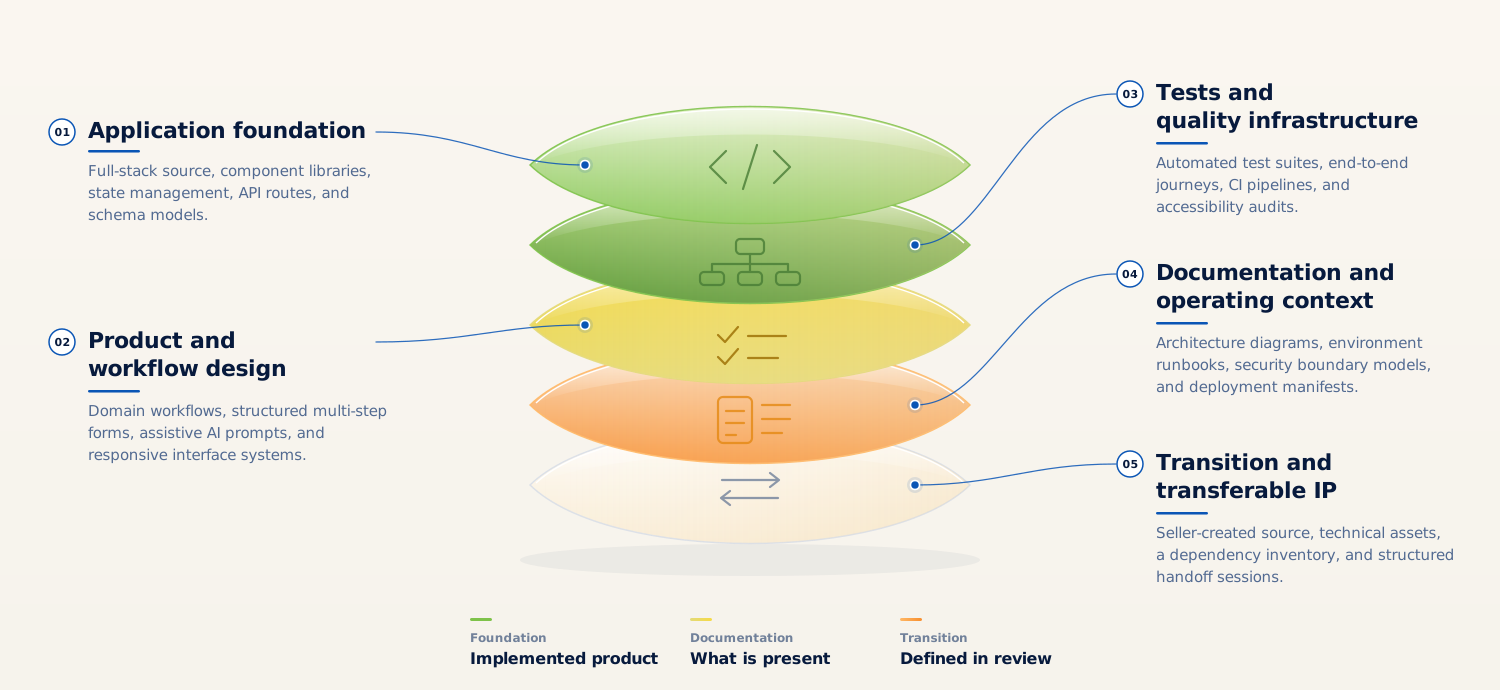
Lesson workspace application
NEXT.JS TEACHER WORKSPACE AND INTERACTIVE LESSON MAP
Extraction & schema engine
SOURCE-BLOCK, CONSTRUCT ANALYSIS, AND COGNITIVE LOAD SCHEMAS
Adaptation prompt contracts
5 BOUNDED ADAPTATION MODES WITH STRICT SCOPE DEFENSE
Teacher verification gate
EXPLICIT TEACHER EDIT, APPROVAL, AND PROVENANCE VALIDATION
Document & slide export
ACCESSIBLE TEACHER/STUDENT DOCX AND PRESENTATION EXPORTS
Synthetic fixture harness
BOUNDED LIVE-PROVIDER BENCHMARKS AND DETERMINISTIC SUITES
Engineering handoff docs
STATE-MODEL SPECS, SECURITY RULES, AND DEPLOYMENT MANUALS
Proposed Transfer Inventory & Asset Scope
VERIFIED ARTIFACTS- 01Implemented
Teacher-facing Next.js application and lesson workspace
- 02Implemented
Lesson extraction, source-block, construct, load, and generated-document schemas
- 03Implemented
Structured lesson-analysis, adaptation-generation, and construct-risk AI contracts
- 04Implemented
Deterministic source, audience, adaptation, version, and provenance validation
- 05Implemented
Firebase authentication, persistence, storage rules, and ownership controls
- 06Implemented
Teacher and student DOCX export plus slide-companion support
- 07Documented and versioned
Synthetic evaluation fixtures and evaluation framework
- 08Implemented
Unit, integration, browser, and bounded live-provider verification materials
- 09Documented
Architecture, security, API, state-model, deployment, and engineering documentation
This section describes what exists in the repository. It does not represent every dependency, service account, provider account, domain, credential, or third-party right as transferable.
Questions
Important limits of the current proof of concept
01Does Adaptation Engine create a 504 plan?
No. A teacher may select an access-support type that has already been authorized elsewhere. The application does not diagnose a disability, determine eligibility, interpret an individual plan, or create one.
02Does it use student records to personalize a lesson?
No. The current product boundary is instructional material only. Student records, student profiles, identified student work, rosters, gradebooks, and accommodation-plan documents are outside the POC.
03Does it prove that a generated adaptation preserves the original construct?
No. The application analyzes intended constructs and loads, applies deterministic checks where possible, and produces an advisory construct-risk review. Final instructional judgment remains with the teacher.
04Can it export Google Docs, Slides, PDF, or PowerPoint files?
Not currently. DOCX is the supported export format. Native PPTX, Google Workspace export, and PDF export are outside the current POC.
05Is it available to the public?
No. The current application uses controlled authenticated tester access and has not been deployed as a public production service.


Next step
Review Adaptation Engine as a working proof of concept.
The useful next step is a guided review of the current workflow, its instructional assumptions, and the boundaries that would need to be addressed before a broader teacher pilot. The repository supports a functioning prototype, but the current evidence should not be presented as production or instructional-effectiveness validation.
Staged Review & Diligence Path
ENGAGEMENT SEQUENCEPublic acquisition, licensing, pricing, or production-availability claims should be added only after those decisions are explicitly established. Inquiries are routed through the canonical contact route.