Prosocial Coding
Software portfolio9 Documented Software Assets

Purpose-built software for work where context matters.

Prosocial Coding develops a small portfolio of software products for training, safety, structured workflows, and evidence-informed decision support.

The products are at different stages of development and commercial readiness. Each public brief shows what the product does now, who it is designed for, its current stage and availability, and the evidence available for review.

Prosocial Coding application ecosystem and interface suites
Documented status
Curricula
Protectly
SpeakerFree
CallCraft
Clean transfer
Prosocial Coding software assets connect 9 applications across 5 domains with documented public status and clean transfer.

01 · Supervised crisis-support training software

CallCraft

Practice difficult conversations before they are real.

CallCraft is a practice platform for supervised crisis-support training. Learners work through fictional voice or text scenarios, then review the transcript and AI-drafted coaching with a trainer or supervisor. Organization controls handle scenario management, access, session history, and training operations. CallCraft is for practice only. It isn't for live crisis response, clinical decisions, certification, or unsupervised personnel evaluation.

Primary audience

  • Hotline and crisis-support training teams
  • Domestic and sexual violence coalitions and advocacy programs
  • Advocate and responder training programs
  • Organizations that use structured, scenario-based practice
CallCraft practice session and coaching interface
Representative CallCraft practice session interface showing voice practice, live transcript, and coaching feedback.

02 · Connected-device safety and privacy review software

SpeakerFree

Review connected technology without turning uncertainty into proof.

SpeakerFree helps people concerned about technology-facilitated monitoring, stalking, or coercive control review their connected devices and accounts. It considers safety context before technical action, identifies devices carefully, and keeps uncertainty visible instead of turning it into conclusions.

Primary audience

  • People concerned about technology-facilitated monitoring or stalking.
  • Survivors reviewing connected technology after separation or in shared living situations.
  • Advocates supporting technology-safety conversations.
  • Digital-safety practitioners who want a structured review aid.
SpeakerFree smart-home safety and privacy planning interface
Representative view of the SpeakerFree smart-home safety and privacy planning interface.

03 · Texas protective-order preparation software

Protectly

Organize Texas protective-order information for review.

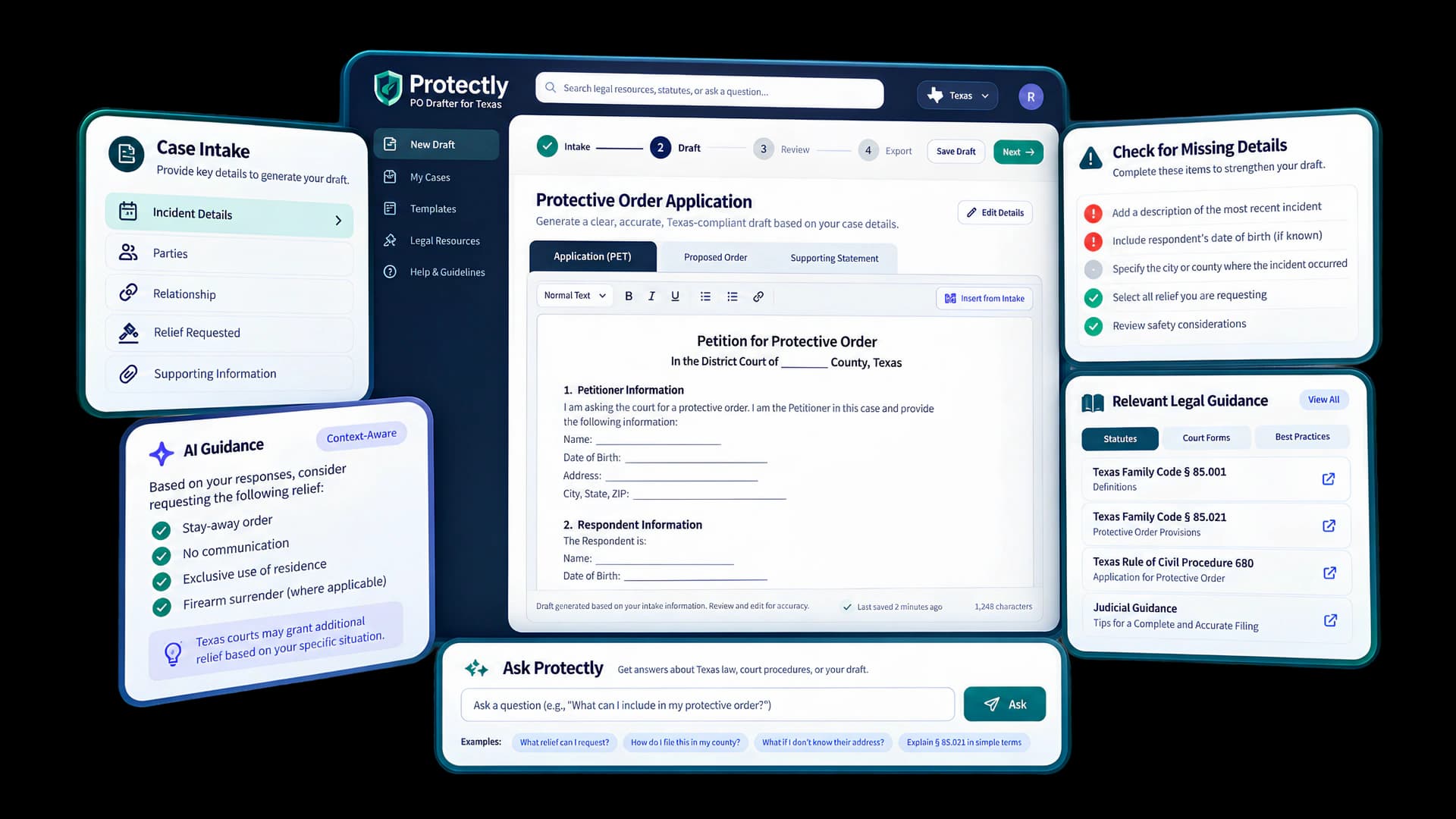
Protectly helps applicants organize incident accounts and reference drafts for a Texas protective-order application, with an advocate review workflow and optional AI assistance. It is a private build tested with fictional information.

Primary audience

  • Legal-aid and access-to-justice organizations
  • Domestic violence programs with legal-support workflows
  • Product teams developing protective-order preparation tools
Protectly survivor intake and Texas protective-order workflow interface
Representative Protectly product interface showing a survivor intake and Texas protective-order workflow.

04 · Evidence-informed curriculum selection

Curricula Intelligence

Compare youth relationship-violence prevention curricula side by side, with the evidence, implementation demands, and open questions in plain view.

Curricula Intelligence is a decision-support tool for the school, district, and prevention teams who choose these programs. Explore a curated registry of 31 program profiles, compare evidence and fit against your local constraints, research current details like pricing and training, and document the reasoning behind your team’s decision.

Primary audience

  • School and district teams comparing programs against local grade, schedule, staffing, and policy requirements.
  • Prevention programs and youth-serving organizations reviewing evidence, delivery demands, safety considerations, and facilitator requirements.
  • Public health, research, and evaluation teams examining evidence and implementation tradeoffs.
  • Curriculum committees and grant teams documenting screening decisions.
  • Technical assistance and policy organizations supporting curriculum review.
Curricula Intelligence curriculum assessment and evidence workspace interface
Representative Curricula Intelligence workspace showing multidimensional curriculum evaluation, radar assessment chart, and evidence comparison.

05 · DV/IPV AI response evaluation software

EchoCheck

Compare how AI responds to domestic violence scenarios when the instructions change.

EchoCheck is evaluation software for examining how AI systems respond to synthetic domestic violence and intimate partner violence (DV/IPV) scenarios. It holds the request constant, changes the instruction condition, and makes response differences easier for human reviewers to inspect.

Primary audience

  • AI safety and responsible-AI teams
  • DV/IPV researchers and evaluators
  • Survivor-serving organizations reviewing possible AI uses
  • Conversational AI product teams
  • Training, policy, and quality-improvement teams
Representative interface showing EchoCheck's comparison workspace
Representative interface showing EchoCheck's comparison workspace.

06 · AI-assisted lesson adaptation and teacher workflow software

Adaptation Engine

Adapt existing lessons while keeping instructional intent, source traceability, and teacher judgment visible.

Adaptation Engine is a teacher-facing proof of concept for adapting existing Texas middle school lessons. A teacher uploads an instructional bundle, reviews a structured Lesson Map of what major tasks appear to measure, and can generate one of five bounded adaptations for reading access, emergent bilingual support, teacher-selected access supports, classroom time, or deeper reasoning. Generated materials remain drafts until the teacher reviews them, and the system keeps source references and instructional boundaries visible throughout the workflow.

Stage
Narrow proof of concept
Availability
Private proof of concept · Approved testers only

Primary audience

  • Texas middle school teachers adapting existing instructional materials.
  • Teachers who need to reduce incidental access barriers without automatically lowering the lesson target.
  • Teachers preparing lesson-level emergent bilingual supports without inferring an individual student’s proficiency.
  • Teachers applying previously authorized access supports, adjusting lesson timing, or extending cognitive depth.
Representative product viewPublic-safe evidence
Adaptation Engine logo
Texas MS Science · TEKS 7.5A (Photosynthesis & Energy Flow)
Lesson Map VerifiedBundle: DOCX + PDF (2 files)
Scope Boundary:Instructional materials only · No student PII or IEP records · Teacher review required for export

Lesson Map Analysis

Tasks extracted from uploaded bundle

3 Tasks

Task 1: Cellular Respiration Diagram & Reading

Teacher Confirmed

Construct: Concept Mastery: Energy Transformations (TEKS 7.5A)

Observed Load: High Reading Comprehension Load (Incidental Barrier)

Selected for Adaptation[Ref: §1.2]

Task 2: Light Reaction Hands-on Lab Inquiry

Protected Target

Construct: Scientific Reasoning: Chemical Transformation (TEKS 7.1B)

Observed Load: Direct Empirical Inquiry (Central Construct)

Preserved as Central Target[Protected]

Task 3: Independent Written Energy Synthesis

Teacher Confirmed

Construct: Analytical Synthesis: Scientific Explanation

Observed Load: Linguistic Production Load (Incidental Barrier)

Selected for Adaptation[Ref: §1.2]

Construct Guard: Central inquiry constructs are locked to prevent automated reduction of learning standards.

Five Bounded Adaptation Modes

Choose constrained generation path

Mode: Reading Access

Reading Access

Emergent Bilingual

Teacher-Selected Access

Time Fit Plan

Depth Extension

Active Mode: Reading AccessRule Check: Passed

Applies sentence structure and layout chunking to Tasks 1 and 3. Central TEKS 7.5A science vocabulary and concepts are preserved verbatim.

Draft Artifact: TEKS_7.5A_ReadingAccess_v1.docxEditable Draft

Part A: Plant Energy Transformation (Adapted for Reading Access)

Source excerpt linked to canonical lesson bundle §2.3. Reading barrier reduced; science content maintained.

1. Plants absorb light energy from the sun through chlorophyll. [Ref: Task 1]
2. In the chloroplast, radiant energy transforms into chemical energy (glucose).

Teacher Review Checkpoint

Confirmed: Tasks match target standard · Ready for DOCX export

Export DOCX

Teacher edits reset review status · Generation does not constitute STAAR or legal compliance

07 · Survivor-facing technology review software

Survivor Tech Review

Look closely before you recommend survivor-facing technology.

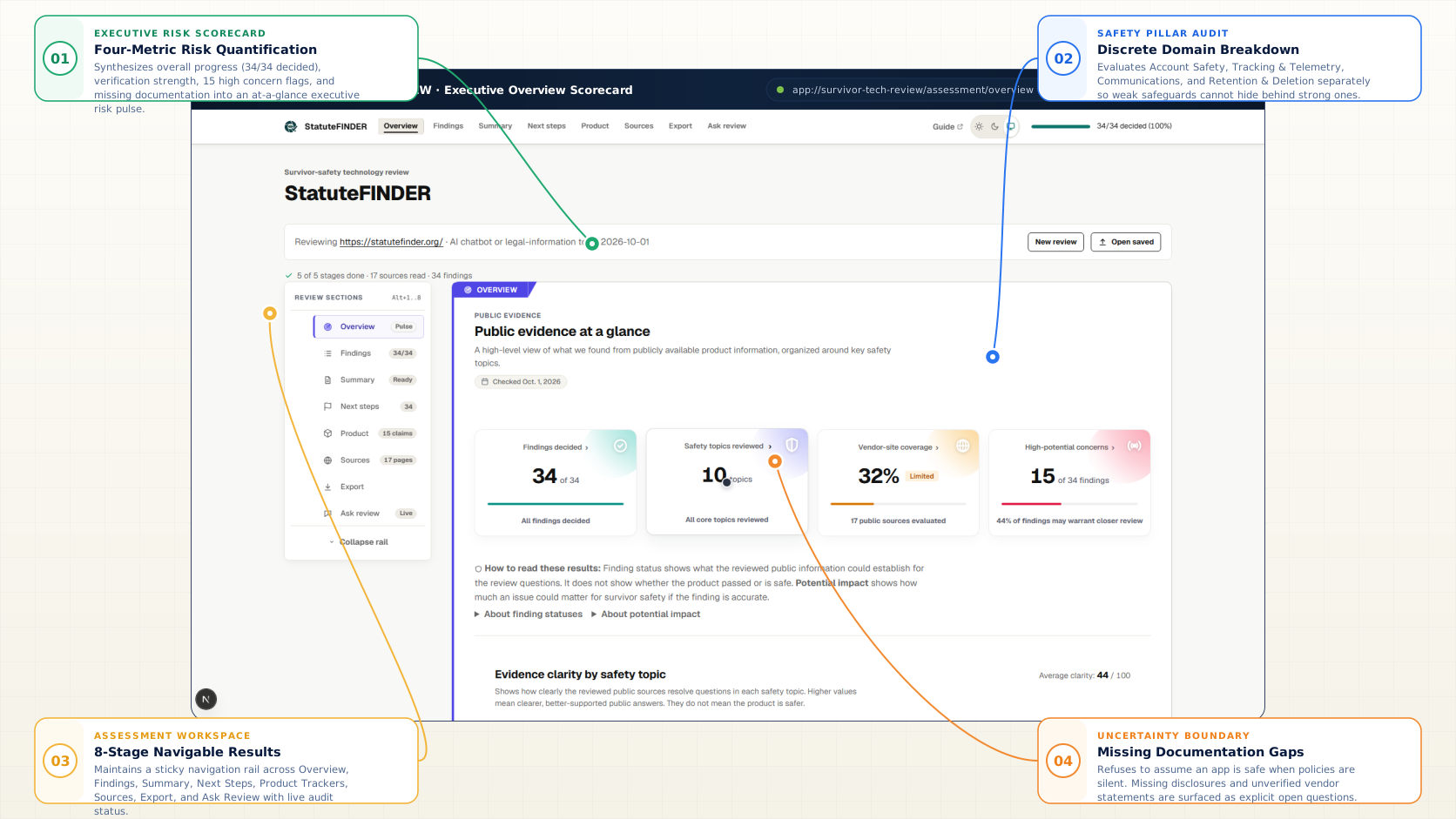
Survivor Tech Review helps domestic violence advocates and coalition staff examine apps and websites using public evidence, survivor-safety review criteria, evidence-linked findings, and explicit human review. It surfaces what is known, what remains unresolved, what could matter for survivor safety, and what a reviewer should do next without certifying a product as safe.

Stage
Functional build
Availability
Private evaluation build

Primary audience

  • Domestic violence advocates evaluating survivor-facing apps or websites.
  • State, territorial, and tribal DV/SA coalition staff reviewing technology recommendations.
  • Program managers and safety-tech leads assessing digital tools before recommending them.
  • Researchers and evaluators conducting structured survivor-safety reviews of tech products.
Representative product viewPublic-safe evidence
Representative Survivor Tech Review executive scorecard and assessment workspace

08 · AI-assisted presentation and facilitation software

DeckSpeak

Turn source material into a presentation you can review, shape, deliver, and question while keeping the presenter in control.

DeckSpeak is an AI-assisted presentation and facilitation workspace for people who need to turn existing source material into a structured presentation without treating generation as the final step. A presenter starts with one active PDF, DOCX, TXT file, or pasted source, configures the audience and session, reviews and edits the proposed outline, then inspects and modifies the generated deck before presenting it. During review and delivery, Ask DeckSpeak can answer typed or voice questions using the current deck, speaker notes, and connected source excerpts when available. The presenter retains control over what is edited, presented, regenerated, ignored, or exported. Decks can be exported to PowerPoint, PDF, narrated-script text, or DeckSpeak JSON.

Stage
Live application · Active development
Availability
Available for acquisition

Primary audience

  • Facilitators building workshops from existing organizational material.
  • Learning and development or HR training teams.
  • Educators and instructors turning source material into structured presentations.
  • Consultants preparing research, policy, strategy, or client-facing sessions.
  • Professionals who want contextual presentation assistance without leaving the deck.
Representative product viewPublic-safe evidence
DeckSpeak WorkspaceVerified Deployment
Active Source: 1 DocumentPPTX · PDF · Script · JSON
Authentic DeckSpeak presentation workspace showing source intake, presentation plan, slide editing, and Ask DeckSpeak Q&A

09 · Texas legislative decision-support and advocacy software

Texas Legislature Tracker

Follow a scoped Texas policy record from source to advocacy preparation.

Texas Legislature Tracker is a decision-support and advocacy workspace designed to bridge the gap between official state legislative records and frontline policy advocacy. Built around a scoped candidate corpus of Texas legislation focused on survivor safety, domestic violence prevention, and justice reform, the platform ingests official data from OpenStates and Texas Legislature RSS feeds on a scheduled daily cadence. The system enforces rigorous architectural separation: upstream state filings and companion records remain unalterable; application logic computes deterministic full-text search and similar bill recommendations without generative hallucination; advocacy teams manage private campaigns and priority tags with row-level security; and evidence-gated AI assistants prepare meeting briefs and 3-minute hearing testimony with mandatory human review.

Stage
Functional application · Continuous sync
Availability
Available for acquisition

Primary audience

  • Legislative directors and policy analysts tracking state policy development.
  • Advocacy coalitions coordinating statewide campaigns across legislative sessions.
  • Non-profit executive directors and program leaders testifying before committees.
  • Government affairs professionals monitoring bill movements and committee referrals.
  • Legal aid and survivor advocacy organizations tracking family violence and justice statutes.
Representative product viewPublic-safe evidence
Texas Legislature TrackerVerified Deployment
Daily Sync: 08:00 UTCTexas · Registered Sessions
Authentic Texas Legislature Tracker workspace showing bills list, policy filters, companion measures, and priority tags

Compare at a glance

The same questions, answered for every product.

The products are intentionally different, but a few shared facts make initial comparison easier.

Products 1–3 of 9Slide to compare 3 at a time
Comparison of PSC products by product type, primary use, primary audience, current public stage, and availability.
AttributeCallCraftSpeakerFreeProtectlyCurricula IntelligenceEchoCheckAdaptation EngineSurvivor Tech ReviewDeckSpeakTexas Legislature Tracker
Product typeSupervised crisis-support training softwareConnected-device safety and privacy review softwareTexas protective-order preparation softwareEvidence-grounded curriculum decision-support softwareAI response evaluation softwareTeacher-facing AI lesson adaptation softwareSurvivor-facing technology review softwareAI-assisted presentation and facilitation workspaceTexas legislative decision-support and advocacy software
Primary usePractice difficult crisis-support conversations with fictional callers, then review transcripts and AI-drafted coaching under human supervision.Review connected technology, confirm device identity, and consider safer next steps without treating uncertainty as proof.Organize application information and reference drafts for review.Compare youth relationship-violence curricula by evidence, fit, implementation demands, policy context, and tradeoffs.Compare AI behavior on domestic violence scenarios across controlled instruction conditions.Analyze an existing lesson and generate bounded adaptations for access, language support, classroom time, or deeper reasoning while retaining teacher review and source traceability.Examine apps and websites using public evidence, survivor-safety review criteria, deterministic evidence checks, and human-controlled review decisions.Convert source material into structured, editable presentations with human outline approval, presenter delivery tools, and contextual Q&A.Track candidate Texas bills, analyze legislative activity, map districts, organize stakeholder campaigns, and draft testimony or briefing materials with evidence gating.
Primary audienceHotline, advocacy, and crisis-support training teams with an established human-led training model.People concerned about technology-facilitated abuse, and the advocates and practitioners who support them.Legal-aid, access-to-justice, and domestic violence organizations.School and district teams, prevention programs, public health specialists, and grant committees.AI safety, research, product, and survivor-serving evaluation teams.Texas middle school teachers working from existing instructional materials.Domestic violence advocates and coalition staff evaluating digital tools.Facilitators, corporate trainers, educators, strategy consultants, and presentation professionals.Policy researchers, advocacy coalitions, government affairs teams, non-profit directors, and legislative analysts.
Current public stageControlled-pilot candidate · Pre-revenueLive in controlled pilot · Pre-revenuePrivate buildLive in production · Pre-revenue · Available for acquisitionPrivate build · Pre-revenueNarrow proof of concept · Private controlled testingFunctional build · Private evaluation buildLive application · Pre-revenue · Available for acquisitionFunctional application · Available for acquisition
AvailabilityAvailable for acquisitionAvailable for acquisitionPre-revenue software project available for acquisitionSoftware and evidence package ready for acquisition.Available for acquisitionApproved testers onlyPrivate evaluation buildSoftware package and facilitation architecture ready for acquisition.Full application codebase, ingestion pipelines, database schemas, and prompt suites ready for transfer.
CallCraft
Product type
Supervised crisis-support training software
Primary use
Practice difficult crisis-support conversations with fictional callers, then review transcripts and AI-drafted coaching under human supervision.
Primary audience
Hotline, advocacy, and crisis-support training teams with an established human-led training model.
Current public stage
Controlled-pilot candidate · Pre-revenue
Availability
Available for acquisition
SpeakerFree
Product type
Connected-device safety and privacy review software
Primary use
Review connected technology, confirm device identity, and consider safer next steps without treating uncertainty as proof.
Primary audience
People concerned about technology-facilitated abuse, and the advocates and practitioners who support them.
Current public stage
Live in controlled pilot · Pre-revenue
Availability
Available for acquisition
Protectly
Product type
Texas protective-order preparation software
Primary use
Organize application information and reference drafts for review.
Primary audience
Legal-aid, access-to-justice, and domestic violence organizations.
Current public stage
Private build
Availability
Pre-revenue software project available for acquisition
Curricula Intelligence
Product type
Evidence-grounded curriculum decision-support software
Primary use
Compare youth relationship-violence curricula by evidence, fit, implementation demands, policy context, and tradeoffs.
Primary audience
School and district teams, prevention programs, public health specialists, and grant committees.
Current public stage
Live in production · Pre-revenue · Available for acquisition
Availability
Software and evidence package ready for acquisition.
EchoCheck
Product type
AI response evaluation software
Primary use
Compare AI behavior on domestic violence scenarios across controlled instruction conditions.
Primary audience
AI safety, research, product, and survivor-serving evaluation teams.
Current public stage
Private build · Pre-revenue
Availability
Available for acquisition
Adaptation Engine
Product type
Teacher-facing AI lesson adaptation software
Primary use
Analyze an existing lesson and generate bounded adaptations for access, language support, classroom time, or deeper reasoning while retaining teacher review and source traceability.
Primary audience
Texas middle school teachers working from existing instructional materials.
Current public stage
Narrow proof of concept · Private controlled testing
Availability
Approved testers only
Survivor Tech Review
Product type
Survivor-facing technology review software
Primary use
Examine apps and websites using public evidence, survivor-safety review criteria, deterministic evidence checks, and human-controlled review decisions.
Primary audience
Domestic violence advocates and coalition staff evaluating digital tools.
Current public stage
Functional build · Private evaluation build
Availability
Private evaluation build

DeckSpeak

Product type
AI-assisted presentation and facilitation workspace
Primary use
Convert source material into structured, editable presentations with human outline approval, presenter delivery tools, and contextual Q&A.
Primary audience
Facilitators, corporate trainers, educators, strategy consultants, and presentation professionals.
Current public stage
Live application · Pre-revenue · Available for acquisition
Availability
Software package and facilitation architecture ready for acquisition.

Texas Legislature Tracker

Product type
Texas legislative decision-support and advocacy software
Primary use
Track candidate Texas bills, analyze legislative activity, map districts, organize stakeholder campaigns, and draft testimony or briefing materials with evidence gating.
Primary audience
Policy researchers, advocacy coalitions, government affairs teams, non-profit directors, and legislative analysts.
Current public stage
Functional application · Available for acquisition
Availability
Full application codebase, ingestion pipelines, database schemas, and prompt suites ready for transfer.

The comparison is for orientation. The full product brief carries the product-specific workflow, evidence, limitations, technical context, and acquisition details.

04 / FROM INTEREST TO REVIEW

Enough to assess.A clear path to verify.

Each app brief shows who the product serves, how it works, what exists today, and where its limits remain.

If there is a potential fit, the next step is a structured review of the technical, security, and operational details.

  1. 01

    Public brief

    Understand the product

  2. 02

    Fit conversation

    Confirm mutual fit

  3. 03

    Private review

    Verify the evidence

Sensitive source, security, and diligence materials are shared during private review.

Next step

Found a product worth a closer look?

Open its full public brief for the deeper product story, or review the acquisition path to understand evaluation and transfer. If the current portfolio does not match the problem you are trying to solve, Prosocial Coding also offers advisory work, custom software development, and AI training.