Configure practice
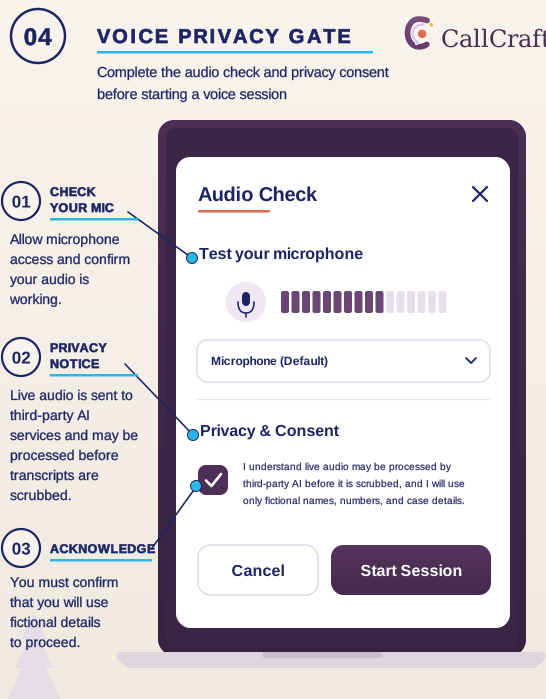
Select a fictional scenario, difficulty level, training focus, and practice mode.
Supervised crisis-support training
Practice difficult conversations before they are real.
CallCraft is a practice platform for supervised crisis-support training. Learners work through fictional voice or text scenarios, then review the transcript and AI-drafted coaching with a trainer or supervisor. Organization controls handle scenario management, access, session history, and training operations.
CallCraft is for practice only. It isn't for live crisis response, clinical decisions, certification, or unsupervised personnel evaluation.
Support note
Need support now? CallCraft is a training tool and can't help in a crisis. Call or text 988, or contact the National Domestic Violence Hotline at 1-800-799-7233 or thehotline.org.
Why practice matters
Crisis-support work depends on conversations that are difficult to practice safely. Live role-play takes trainer time to arrange and can vary with who plays the caller. Without a record of what was said, feedback often depends on memory. CallCraft gives learners a repeatable way to practice with fictional callers and gives supervisors a transcript to review with them afterward.
Product walkthrough
Move from choosing a fictional scenario to voice or text practice, then into a structured review of the conversation, the transcript, coaching observations, and themes for the next session.
Authentic application views and annotated training workflows based on the current CallCraft crisis training interface.
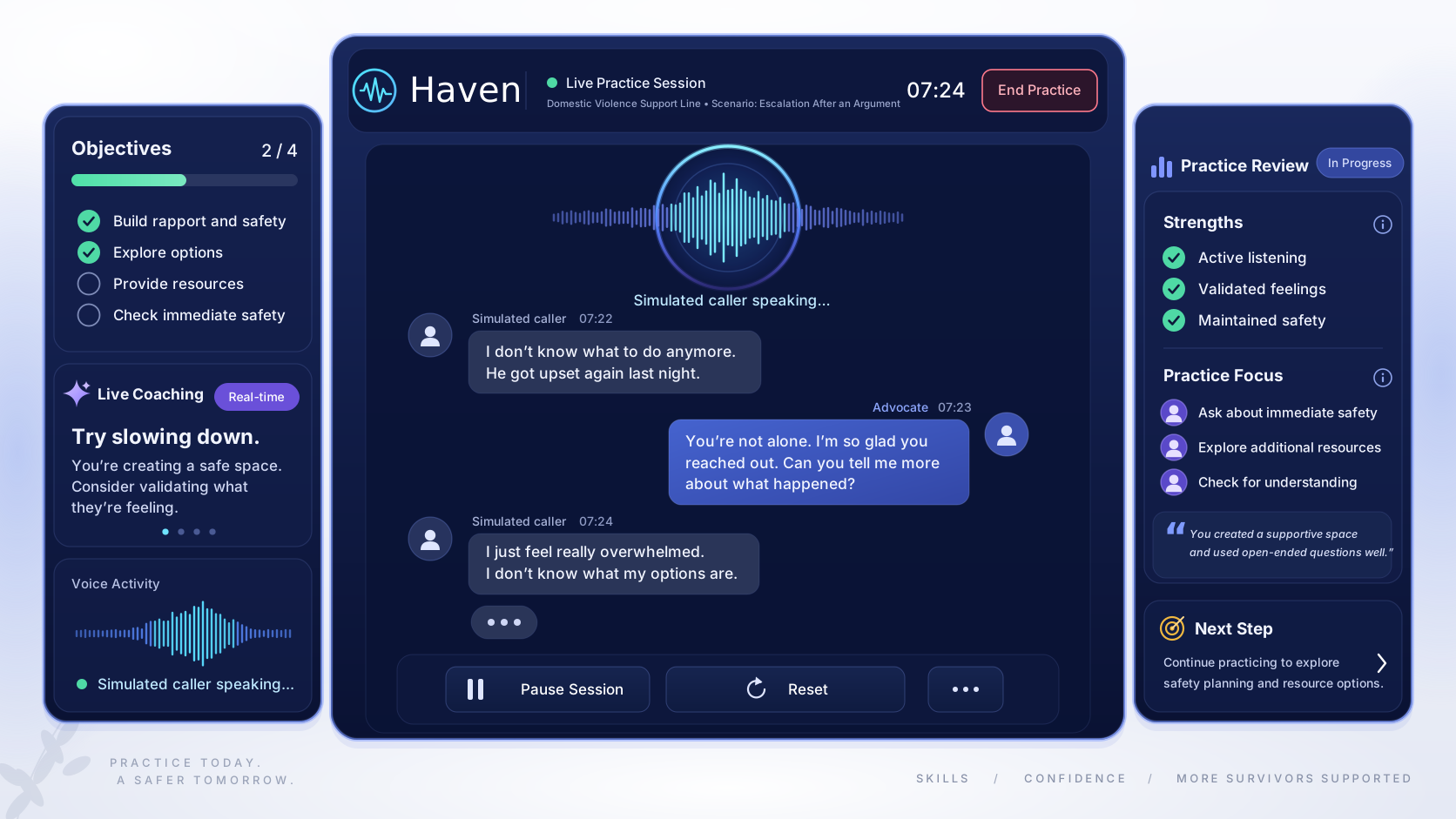
Trainees conduct realistic voice or text conversations with synthetic callers experiencing dynamic emotional escalation.
Active simulation console with live audio wave, latency metrics, safety intervention trigger, and scenario prompt.
Supervised practice workflow
Choose a fictional scenario, practice with an AI-simulated caller, review the conversation, add trainer context, and repeat to support ongoing skill development.
Select a fictional scenario, difficulty level, training focus, and practice mode.
Work through the conversation by voice or text with an AI-simulated caller.
Examine the transcript, the coaching draft, strengths, growth areas, supporting evidence, and themes for the next session.
A trainer or supervisor reviews the AI-generated material against organizational standards, training goals, and the context of the session.
Use the completed session and prior history to guide another attempt or a different training focus.
Practice, review, supervision, repeat
Select a fictional scenario, difficulty level, training focus, and practice mode.
Work through the conversation by voice or text with an AI-simulated caller.
Examine the transcript, the coaching draft, strengths, growth areas, supporting evidence, and themes for the next session.
A trainer or supervisor reviews the AI-generated material against organizational standards, training goals, and the context of the session.
Use the completed session and prior history to guide another attempt or a different training focus.
Practice creates another chance to try the conversation. Human supervision provides the context for deciding what the practice means.
Exact workflow
Select a fictional scenario, difficulty level, training focus, and practice mode.
Work through the conversation by voice or text with an AI-simulated caller.
Examine the transcript, the coaching draft, strengths, growth areas, supporting evidence, and themes for the next session.
A trainer or supervisor reviews the AI-generated material against organizational standards, training goals, and the context of the session.
Use the completed session and prior history to guide another attempt or a different training focus.
Select a fictional scenario, difficulty level, training focus, and practice mode.
Work through the conversation by voice or text with an AI-simulated caller.
Examine the transcript, the coaching draft, strengths, growth areas, supporting evidence, and themes for the next session.
A trainer or supervisor reviews the AI-generated material against organizational standards, training goals, and the context of the session.
Use the completed session and prior history to guide another attempt or a different training focus.
Capabilities
CallCraft connects learner practice, structured review, scenario management, and organization administration in one training system.
Implemented capabilities
CallCraft connects learner practice, structured review, scenario management, and organization administration in one training system.
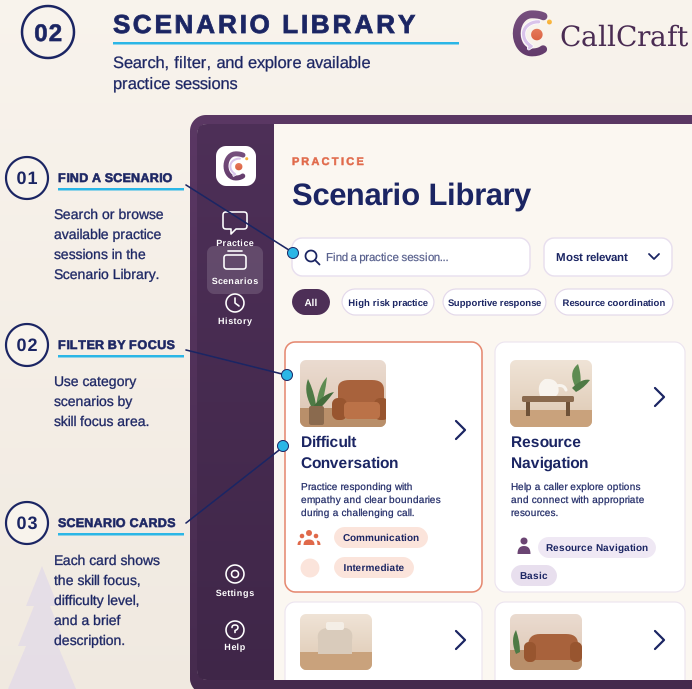
Learners choose fictional scenarios and work at different difficulty levels and training focuses.
Both modes run on the same scenario system, so learners practice with an AI-simulated caller rather than a real one.
Completed sessions can produce structured AI-drafted feedback tied to the practice transcript.
Brings together transcript evidence, strengths, growth areas, and practice objectives, with suggested themes for the next session.
Authorized administrators create and edit training scenarios. AI can help draft them, and people review scenarios before they're used in training.
History, report, and progress views help trainers follow practice over time, with access limited to each organization.
Data export, user-initiated account deletion, and automatic expiration and cleanup of stored data.
Training and AI boundaries
CallCraft uses generative AI to simulate fictional callers and to draft coaching, analysis, and scenarios. Those outputs can be incomplete or wrong. They're training aids, not authoritative assessments.
Simulates fictional caller conversations
Drafts coaching observations and practice feedback
Identifies transcript patterns and practice signals
Helps draft training scenarios
Defines scenarios, protocols, and training goals
Reviews the draft and applies professional and organizational context
Determines meaning, relevance, and appropriate follow-up
Reviews and edits scenario content before use
Coaching and practice signals aren't clinical measures, certification, pass/fail results, job-readiness determinations, or personnel ratings. CallCraft isn't for live crisis response, emergency dispatch, or clinical decision-making.
Use fictional information only. Training and demonstrations should use fictional or synthetic material. Don't enter real survivor, client, caller, or case details.
Voice goes to an outside AI service. During voice practice, audio is processed by an external AI service in real time, before any scrubbing can happen.
Scrubbing has limits. Saved transcripts are scrubbed before storage, but scrubbing doesn't cover every piece of generated analysis. It isn't a substitute for keeping real information out.
Data controls are built in. Data export, account deletion, and retention controls are part of the application. How they behave in a specific deployment is verified during review.
Access is server-controlled, data is scoped to each organization, and sensitive operations like coaching, analysis, scenario generation, and saving run through the server.
Use contexts and operator requirements
training teams
training programs
training model
These describe intended use and operator fit. They don't indicate current use, endorsement, or partnership by any organization.
Current state
CallCraft's core features are implemented: scenarios, voice and text practice, coaching and analysis, session history, organization administration, and data controls. It's classified as a controlled-pilot candidate, which means final release verification comes before a pilot begins. Verification details are available during review.
Proposed transfer scope
FULL-STACK LIFELINE SIMULATION WORKSPACE & TRANSCRIPT ENGINE
FICTIONAL SCENARIOS, SIMULATED CALLER PERSONAS, AND DIFFICULTY MODELS
CALL-STAGE TIME INTERVALS, EMPATHY CHECKS, AND DE-ESCALATION RUBRICS
REAL-TIME HUMAN-AI BOUNDARY FILTERING AND ZERO AUDIO STORAGE RULES
TRAINING METRICS, REVIEW DASHBOARDS, AND ANNOTATION TOOLS
SIMULATION HARNESSES, VOICE SYNTHESIS CHECKS, AND UNIT TESTS
SUPERVISOR MANUALS, RUNBOOKS, AND DEPLOYMENT INFRASTRUCTURE
Proposed transfer scope
FULL-STACK LIFELINE SIMULATION WORKSPACE & TRANSCRIPT ENGINE
FICTIONAL SCENARIOS, SIMULATED CALLER PERSONAS, AND DIFFICULTY MODELS
CALL-STAGE TIME INTERVALS, EMPATHY CHECKS, AND DE-ESCALATION RUBRICS
REAL-TIME HUMAN-AI BOUNDARY FILTERING AND ZERO AUDIO STORAGE RULES
TRAINING METRICS, REVIEW DASHBOARDS, AND ANNOTATION TOOLS
SIMULATION HARNESSES, VOICE SYNTHESIS CHECKS, AND UNIT TESTS
SUPERVISOR MANUALS, RUNBOOKS, AND DEPLOYMENT INFRASTRUCTURE
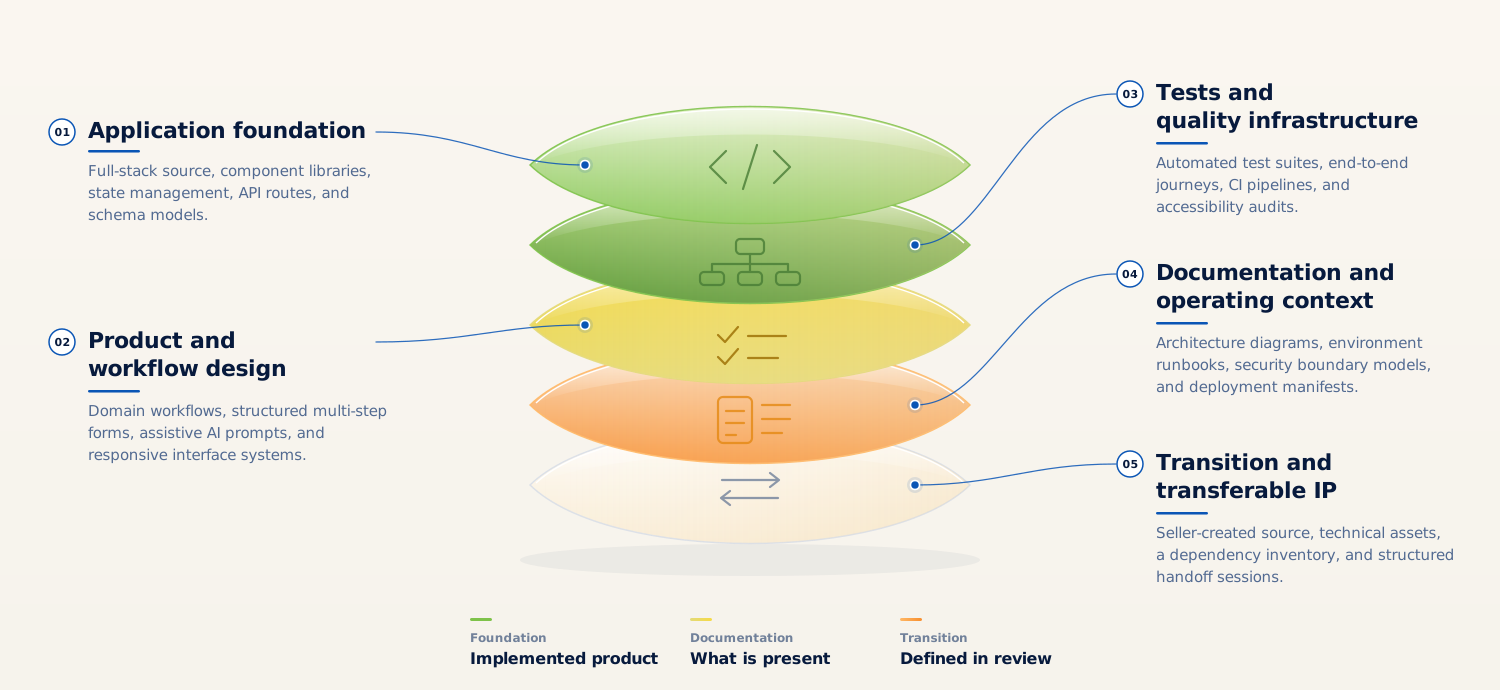
01 Application. Full-stack TypeScript web application source (private repository).
02 Scenario and persona system. Fictional scenarios, simulated caller personas, and difficulty and focus structures.
03 Practice and review workflows. Voice and text simulation, coaching and analysis, and after-action review.
04 Organization administration. Roles, access, session history, and reporting.
05 Data controls and verification. Account lifecycle and data controls, automated tests, release tooling, and deployment configuration.
06 Documentation and transition. Architecture, operations, maintenance, and handoff materials.
A transaction would define which project assets are included, such as the maintained source and history, original scenario content, design materials, documentation, brand assets, and transition support. Licensing status and third-party service accounts are reviewed during diligence and shouldn't be assumed to transfer with the project.
Questions
No. It's designed for organizations that already run human-led training. Trainers and supervisors set the standards, review the AI-drafted coaching, and decide what each practice session means.
It starts with a conversation about your organization and how you would operate or extend CallCraft. If there's a fit, review can move into a private product walkthrough, technical, privacy, and training-model review, transfer-scope review, and transition planning. Detailed materials are shared at the appropriate stage.
Evaluate CallCraft
CallCraft is available for acquisition as a pre-revenue training software project. A serious evaluation looks at the product experience, the human and AI boundaries, verification status, deployment and AI-service requirements, data handling, and transfer scope. The next step is a private product walkthrough.
Staged Review & Diligence Path
ENGAGEMENT SEQUENCEProduct experience and fictional caller simulation walkthrough
Human and AI training boundaries and supervised coaching model
Verification status, test suite, and technical architecture review
Deployment and external AI-service requirements review
Data handling, retention controls, and account lifecycle review
Proposed transfer scope and transition planning discussion
All inquiries are routed through the canonical contact route for qualification, seller review, and staged diligence access. Offered by Prosocial Coding LLC. Third-party product names and trademarks belong to their respective owners. Page last updated September 2026.