User context
Applicant information
Facts, relationships, incidents, and requested protections.
Texas protective-order preparation
Organize Texas protective-order information for review.
Protectly helps applicants organize incident accounts and reference drafts for a Texas protective-order application, with an advocate review workflow and optional AI assistance. It is a private build tested with fictional information.
Support note
Looking for help? If someone else may monitor your device, consider reading on a device they can't access. For help with a protective order in Texas, TexasLawHelp.org has information and official forms. For domestic violence support, contact the National Domestic Violence Hotline at 1-800-799-7233 or thehotline.org.
Legal & safety boundaries
A clear handoff from user context to software preparation, human review, and court authority.
User context
Facts, relationships, incidents, and requested protections.
Software preparation
Structures information and prepares drafts for review.
Software preparation ends here
Human review
Advocate or legal professional assesses the draft and next steps.
External authority
Only an authorized court can issue a protective order.
Tools to prepare. People to review. Courts to decide.
Preparation and its limits
Protective-order preparation involves bringing together personal information, incident accounts, and requested protections. Protectly provides a structured place to organize those materials before review.
Product in action
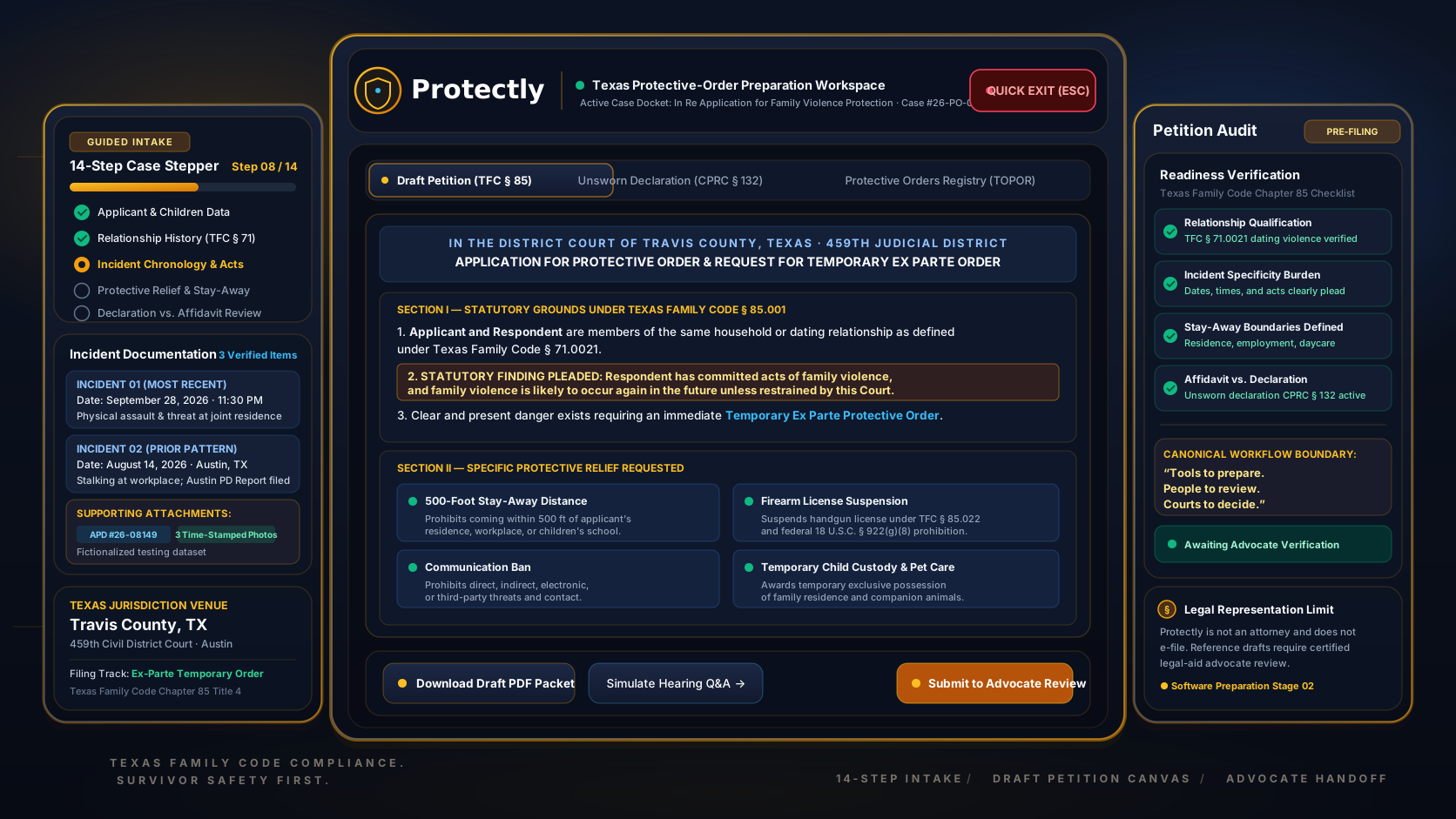
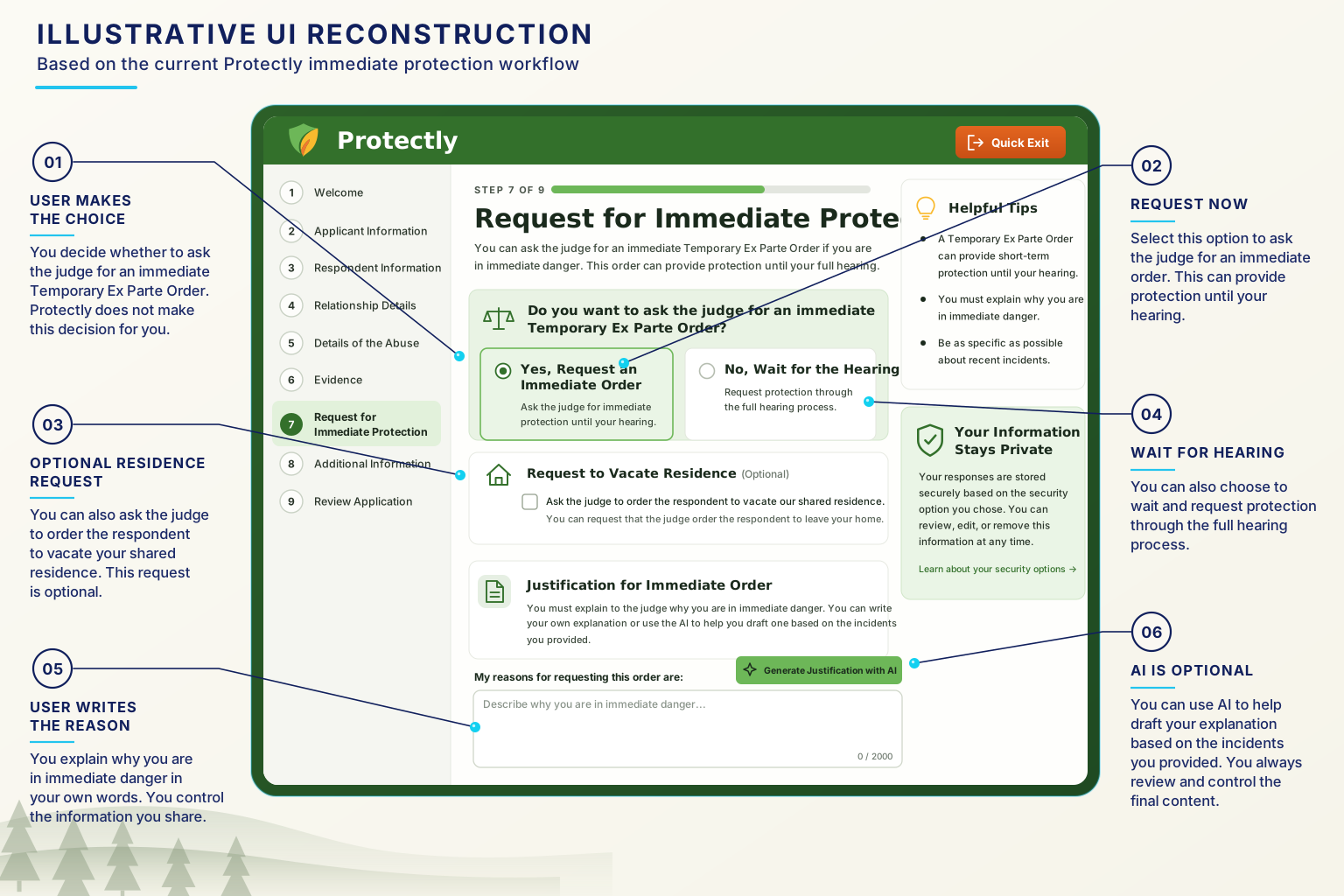
Applicant information, incident accounts, requested protections, filing context, and preparation tools are organized within a guided workflow. These views use fictional information and do not represent legal advice or a live court filing.
Authentic application views and workflow diagrams using fictional test data. Reference drafts, practice tools, and filing simulation are shown.
The workflow begins with application orientation and safer-session setup so the user can understand the preparation path and review available privacy and exit controls.
Guided preparation
The workflow moves from entering information to checking, organizing, and sharing it for review.
Record information about the applicant, respondent, relationship, and people included in the request.
Add incident accounts, dates and locations where known, and supporting images.
Work through requested protections, temporary-order information, filing details, and the affidavit or declaration section.
Check the information, consider optional preparation tools, and create reference documents.
Download materials or use the configured advocate-review workflow. An operator would need to staff and manage that service before offering it to applicants.
Record information about the applicant, respondent, relationship, and people included in the request.
Add incident accounts, dates and locations where known, and supporting images.
Work through requested protections, temporary-order information, filing details, and the affidavit or declaration section.
Check the information, consider optional preparation tools, and create reference documents.
Download materials or use the configured advocate-review workflow. An operator would need to staff and manage that service before offering it to applicants.
Capabilities
A compact visual of how structured information becomes reviewable draft materials.
Applicant, respondent, household, and relationship context.
Relief and filing details organized beside the underlying facts.
Protective Order Draft Packet
CAUSE NO. 2026-CI-00000 // EX PARTE
Chronological incidents and relevant history kept in one structured record.
Structured information. Stronger preparation.
Narrative and form drafts prepared for human review.
Inside Protectly
Arranges dated incidents chronologically. It displays recorded information without independently verifying events.
Creates a preview and downloadable Word reference document from entered information. It is not an official court form.
Organizes the information entered for a temporary-order request into a separate reference document.
Provides an editable space for the applicant's own account of how the situation affected them.
Suggests structured details from an incident account. Users can accept or discard those suggestions before they update the record.
Organizes reported incidents into a draft packet. Generated interpretations require review and do not establish a legal violation.
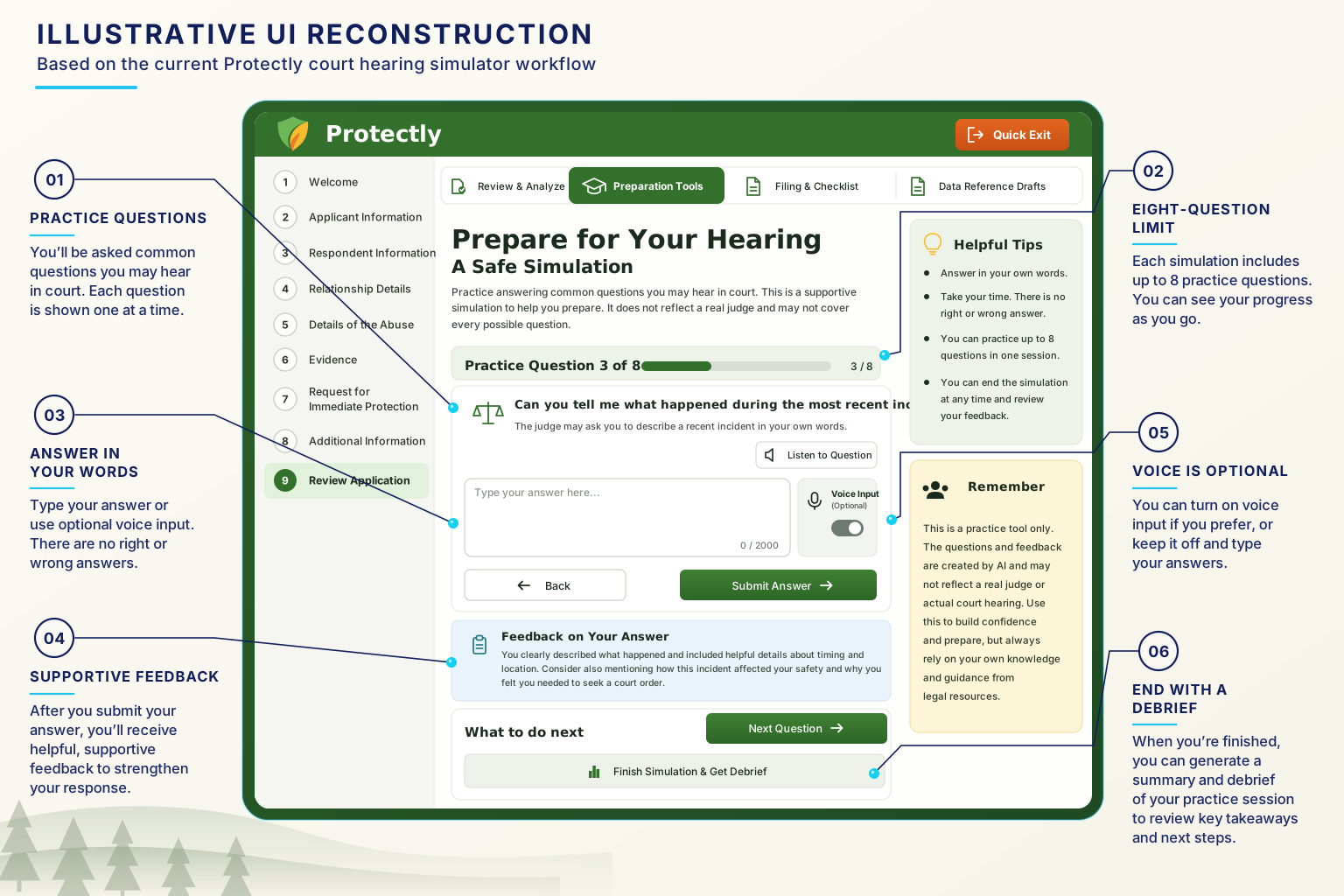
Supports text-based practice questions, responses, and feedback. It does not predict how a hearing will go.
Returns suggested courthouse information. Contact details and filing instructions require independent confirmation.
Sends application information into a configured review queue. It is an implemented workflow, not an available public referral service.
Gives advocates a workspace for review notes and filing simulation. Simulation does not submit materials to a court.
Available to advocates only. Produces model-generated observations about an application, including a strength label. These are not a validated assessment of legal merit.
Available to advocates only. Produces draft safety-planning suggestions from entered information and selected concerns, for an advocate to review and adapt with the applicant. Suggestions may not be safe or appropriate for an individual situation.
Leaves the application and attempts to clear known local application data. It does not erase browsing history, downloaded files, monitoring records, or cloud copies.
Information handling
Protectly saves drafts in the browser by default. Someone who can use the same browser profile may be able to reopen them. Optional cloud features send information off the device, and submitting an application for advocate review sends readable application information to the service. These controls do not make a shared or monitored device safe to use.
AI tools can send incident narratives and practice responses for external processing after automated efforts to remove identifying information. Those checks cannot guarantee anonymity.
Filing simulation sends application information to the application service, even though nothing is submitted to a court.
Supporting images become part of the application record and may travel with it when synced or shared. Resizing does not remove information visible within an image.
Address and resource tools can send search information for external processing. Optional microphone input may involve the browser's speech service.
Saved drafts do not automatically expire. Deleting a browser copy does not confirm deletion of cloud copies or applications already shared for review.
Operational records can include request, account, and error information. Collection and retention depend on the deployed settings.
AI suggestions and reference drafts require review before use. Automated checks do not establish factual accuracy, legal suitability, or safety.
Intended use
The intended users are applicants organizing information and advocates reviewing it. The acquisition audience is an organization equipped to develop and operate that workflow responsibly.
developing Texas protective-order preparation tools
These describe intended use and operator fit. They don't indicate current use, endorsement, or partnership by any organization.
Product state
Protectly is available for evaluation as a software project. It has been tested with fictional information only. Further development and operational review are needed before an organization offers it as a service.
Proposed transfer scope
FULL-STACK NEXT.JS / TYPESCRIPT PETITION WORKSPACE
STRUCTURED DOMESTIC VIOLENCE PROTECTION ORDER PREPARATION
AFFIDAVIT GENERATION, EXCLUSION ORDERS, AND COURT PACKET EXPORT
COUNTY-SPECIFIC FILING PROTOCOLS & E-FILING SIMULATION
TRAUMA-INFORMED PROTOCOLS AND ADVOCATE INTEGRATION SPECS
SYNTHETIC JURISDICTION TESTS, LINT HARNESSES, AND CI TOOLING
DEPLOYMENT RUNBOOKS, MAINTAINER HANDOFF, AND ARCHITECTURE DOCS
Proposed transfer scope

FULL-STACK NEXT.JS / TYPESCRIPT PETITION WORKSPACE
STRUCTURED DOMESTIC VIOLENCE PROTECTION ORDER PREPARATION
AFFIDAVIT GENERATION, EXCLUSION ORDERS, AND COURT PACKET EXPORT
COUNTY-SPECIFIC FILING PROTOCOLS & E-FILING SIMULATION
TRAUMA-INFORMED PROTOCOLS AND ADVOCATE INTEGRATION SPECS
SYNTHETIC JURISDICTION TESTS, LINT HARNESSES, AND CI TOOLING
DEPLOYMENT RUNBOOKS, MAINTAINER HANDOFF, AND ARCHITECTURE DOCS
Application implementation and version history
Intake and advocate workflow design
Reference-document generation components
AI preparation components
Original interface and design assets
Protectly branding
Automated verification tooling
Product and operating documentation
Transition and handoff support
Final included assets, transition commitments, licensing status, and third-party service accounts are subject to review and written agreement.
Questions
No. Protectly is a self-help and advocate document preparation tool, not a law firm or legal substitute. It structures survivor narratives and factual disclosures into court-standard Texas protective order paperwork. Legal representation, court advocacy, and legal counsel remain with licensed attorneys or self-represented litigants.
Protectly is calibrated to the Texas Family Code Title 4 protective order framework, supporting standard petitions, temporary ex parte order applications, and supporting sworn affidavits across Texas district and county courts.
Protectly operates with local-first, zero-persistence principles. Data entered during intake remains confined to browser memory and client session state, eliminating centralized database breach risks for survivors facing domestic violence, stalking, or harassment.
Legal aid societies, domestic violence coalitions, law school clinics, or access-to-justice technology organizations with existing advocate networks and legal review infrastructure in Texas or states with comparable statutory requirements.
Evaluate Protectly
Start with a conversation about fit and operating requirements. Technical and content review follows under confidentiality terms.
Staged Review & Diligence Path
ENGAGEMENT SEQUENCEProduct walkthrough
Intended use and operating capacity
Technical and content review
Transfer scope and transition planning
All inquiries are routed through the canonical contact route for qualification, seller review, and staged diligence access.